
Explore from the map
Select a mapped photo location and open the corresponding 360° or standard photo.
Site Viewer 360
Turn geographically positioned photos into an immersive, map-driven experience in ArcGIS Experience Builder. Select a location, look around, and move through your captured site conditions remotely.
Schedule a Site Viewer 360 demo“…Aurizon Network has supplemented its traditional spatial information, including LiDAR, aerial imagery and ground surveys with Panoramic imagery exposed to its GIS through Nodeology.”
Your photos. Your map.
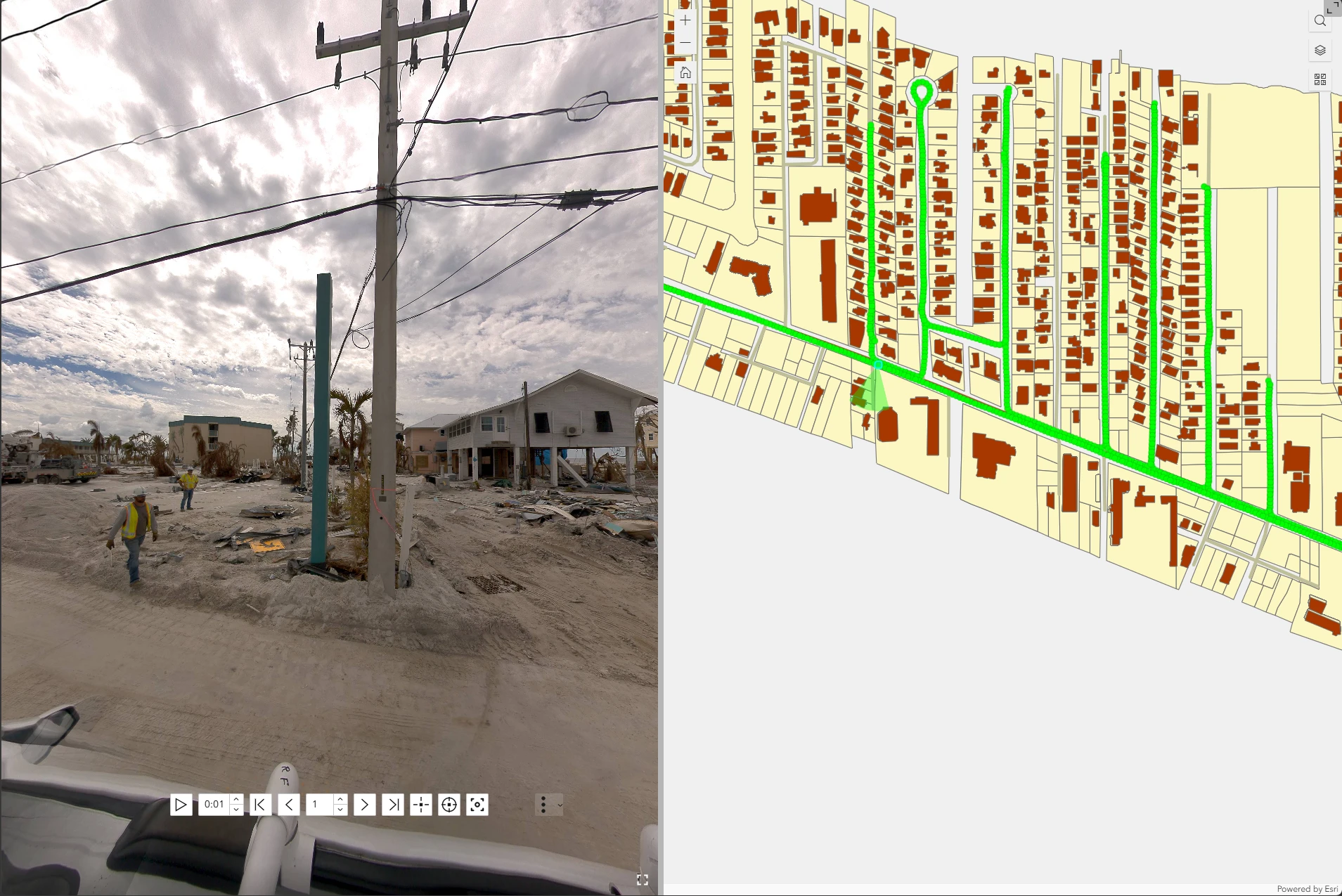
Select a mapped photo location, look around the scene, and move from location to location through a collection of captured conditions.
 View full size ↗
360° imagery gives reviewers surrounding visual context. Look around the captured scene to understand how assets, structures, and site conditions relate to one another.
Move sequentially through geographically positioned photos to review a road, construction site, facility, trail, or utility corridor. Paging and autoplay help you follow the collection geographically.
A point per photo location in an ordinary feature service, with the photo referenced in an attribute or stored as an attachment, so your imagery lives in the same GIS data your team already edits, shares, and queries.
Map → Scene → Information
Select a mapped photo location and open the corresponding 360° or standard photo.
Move from location to location using paging or autoplay to review conditions across a site, road, corridor, or project area.
Use Hotspots to identify important features, add information, and direct reviewers to details within the immersive view.
Hotspots
Turn a 360° photo into an interactive site record. Add clickable Hotspots to identify important features, explain site conditions, and give reviewers additional information without leaving the immersive view.
Call attention to equipment, structures, utilities, damage, or other features visible in the scene.
Add information that helps colleagues understand what they are looking at and why it matters to the project.
Direct attention to specific areas so team members can find the details you want them to review.
360° and standard photos
Use photos from 360° cameras, drones, or mobile devices, including georeferenced photos extracted from video with Geotagged Media Tools. Review captured conditions from their locations in ArcGIS.
Review captured conditions remotely
Reduce the need for repeat site visits by giving project teams remote access to captured conditions.
Document progress and allow project teams to revisit captured site conditions.
Review conditions along roads, trails, rail corridors, and other linear assets.
Give engineers visual context for existing conditions without requiring everyone to visit the site.
Connect field photography to mapped assets and surrounding conditions.
Document sites and changing conditions with geographically positioned imagery.
Create a visual record of buildings, grounds, and infrastructure.
Client perspective
“Site Viewer 360 for ArcGIS provides an easy-to-use, location-based application for utility markouts, construction documentation, and virtual site tours from the ground and the sky”
From collection to collaboration
Use mapped photo locations and their attributes to organize captured imagery and give project teams a common visual record of site conditions.
Capture → Map → Review
Geotagged Media Tools extracts georeferenced photos from video. ArcGIS Pro’s own Geotagged Photos To Points tool turns a photo collection into the point layer.
Explore Geotagged Media ToolsEngineers, project managers, GIS professionals, and field teams can review the same locations, imagery, and geographic context from a shared ArcGIS application.
Plan your workflow
No. It supports both 360° and standard photos linked to mapped locations. With 360° photos, users can look around the captured scene; standard photos show the conventional camera view.
Yes. Site Viewer 360 works with an ordinary point feature service. A specialized oriented imagery catalog is not required.
Site Viewer 360 is an ArcGIS Experience Builder widget for workflows connected to ArcGIS Online or ArcGIS Enterprise. For ArcGIS Online, the app is built with Experience Builder Developer Edition and hosted on your own web server.
Photos stay on any web, cloud, or intranet hosting that allows a web application on another domain to fetch its files.
Point features represent photo locations, and each photo is referenced in an attribute or stored as an attachment. Those mapped locations and attributes allow users to find and open imagery in Site Viewer 360.
The other tools
Evaluate with your own media
Bring a sample of your 360° or standard photos and your ArcGIS setup. We’ll show you how Site Viewer 360 can fit into your existing workflow.
See your imagery in Site Viewer 360